.png)
Create Your First Contact List
Creating a contact list is the foundation for sending campaigns in HelloSMS. A contact list lets you group recipients, define the data you want to store, and prepare your audience for targeted messaging.
Follow these steps to create your first list:
- Go to Contact Lists from the main menu.
- Click + Create new contact list.
- Enter a clear and descriptive name for your list (for example, Customers – Spring Promo). You can change this name later.
- Under Choose which fields to create automatically, select one of the following options:
- Include fields for first name and last name automatically
- Include a field for full name automatically
- Don’t include any fields automatically
-
Click Create to finish creating the new contact list.
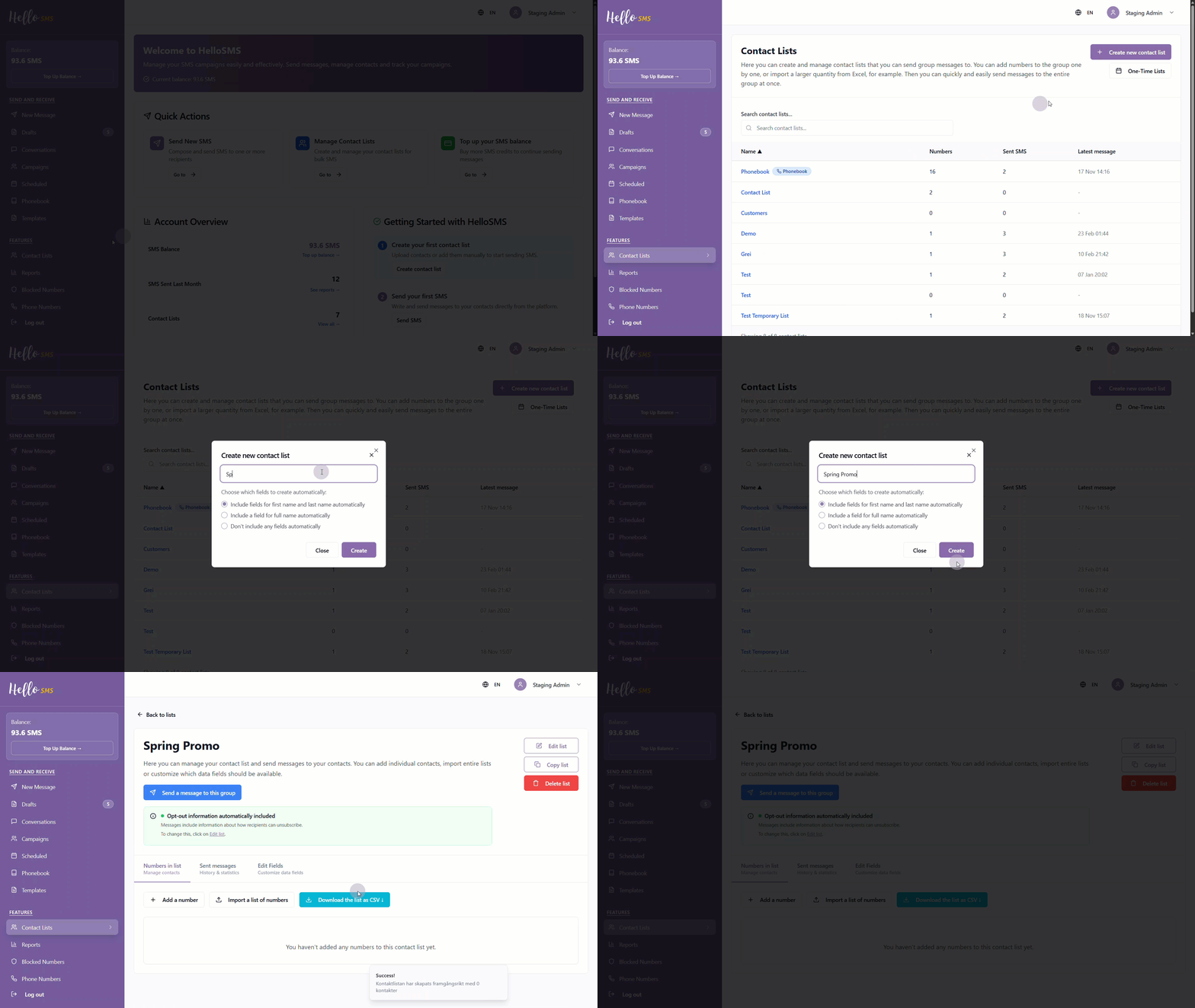
Your contact list is now created.
Add contacts to your list
After creating the list, you can start adding recipients.
You can:
- Add contacts manually
- Import contacts in bulk using a CSV or TSV file
- Include additional data, such as name or city, when importing contacts.
For detailed instructions, see Import Contacts from a Spreadsheet or File.
Customize list fields
You can add custom fields to store additional data and personalize messages later.
Custom fields are created per contact list and can be used for SMS personalization.
To learn how to create and manage custom fields, see Create Custom Data Fields for a Contact List.
Once your list is ready, you can use it to send campaigns, schedule messages, or manage recipients.
Learn More
See the following articles to learn more: